Table of Contents
What Is LinkedIn Outreach?
How to Build an Effective LinkedIn Outreach Strategy
LinkedIn Outreach Automation: How to Scale Without Spamming
Best LinkedIn Outreach Tools
LinkedIn Outreach Templates That Get Replies
How Cleverly Helps Businesses Build Scalable LinkedIn Outreach Systems
Conclusion
Frequently Asked Questions
Modified On :
September 17, 2026
Key Takeaways
- A strong LinkedIn outreach strategy begins with a narrow ICP and a reason the prospect should care now.
- Personalization should reference meaningful business context, not simply repeat a name, job title, or company.
- Each follow-up should introduce a new insight, question, or proof point instead of restating the original pitch.
- LinkedIn and email work best as coordinated channels when every touch reflects the prospect’s previous interactions.
- Track acceptance, positive replies, qualified conversations, meetings, and pipeline instead of judging campaigns by message volume.
LinkedIn outreach is not simply sending connection requests at scale. It is a structured B2B prospecting process that combines accurate targeting, relevant messages, consistent follow-up, and a credible LinkedIn presence.
The channel works because prospects can evaluate the sender before replying. They can see your role, experience, content, mutual connections, and company context within seconds. That visibility can build trust faster than an isolated cold message, but it also exposes weak positioning and generic outreach immediately.
Cleverly has managed thousands of LinkedIn campaigns across different industries, offers, and sales cycles. The strongest campaigns consistently do four things well: define a narrow audience, personalize around meaningful context, follow up without repeating the same pitch, and measure qualified conversations rather than activity alone.
This guide explains how to build a LinkedIn outreach strategy, structure a multistep sequence, combine LinkedIn with email, and improve campaign performance without turning your outreach into inbox noise.
What Is LinkedIn Outreach?
LinkedIn outreach is a B2B prospecting method that uses connection requests, direct messages, InMail, and relevant content engagement to start conversations with potential buyers, partners, or referral sources.
Unlike broad social media marketing, LinkedIn outreach targets specific people based on factors such as their role, seniority, industry, company size, location, and business situation. The goal is not to collect connections. It is to identify relevant prospects, establish context, and move qualified interest toward a conversation.
A complete LinkedIn outreach campaign usually includes five elements:
- A clearly defined ideal customer profile
- A segmented prospect list
- A relevant reason for contacting each segment
- A multistep message sequence
- A process for tracking replies, qualification, meetings, and pipeline
The campaign should feel like a series of connected business conversations, not a queue of automated messages.
Why LinkedIn Outreach Works So Well
Here's the thing: LinkedIn outreach gives you direct access to decision-makers with verified business data.
LinkedIn profiles tell you exactly where someone works, what their role is, and often what problems they're dealing with based on their posts and activity.
Plus, people expect business conversations on LinkedIn. They're already in "work mode" when they open the platform.
Your message isn't competing with vacation photos and memes like it would be on other social channels.
The Four Main LinkedIn Outreach Channels
When you're running a LinkedIn outreach campaign, you've got four main ways to connect with prospects:
- Connection Requests — Your first touch point. You send a request (with or without a note) to connect with someone. Once they accept, you can message them freely. This is how most LinkedIn outreach campaigns start.
- Follow-Up Messages — After someone accepts your connection request, you can send direct messages. This is where the real conversation happens. No character limits, no restrictions — just normal back-and-forth messaging.
- InMails — InMails let you message people you're not connected with. You get a limited number per month with Sales Navigator or LinkedIn Premium. InMails have higher open rates than connection request notes, but you need to use them strategically since they're limited.
- LinkedIn Comments & Engagement — The warm-up move. Commenting on prospects' posts, liking their content, and engaging with what they share builds familiarity before you ever send a message. It's not direct outreach, but it makes your connection request feel less random when it arrives.
Check This Out: Exact LinkedIn Sales Navigator Lead Workflow We Use to Book High-Quality B2B Meetings
🚀 Turn LinkedIn Outreach into Booked Meetings
Don’t just connect. Convert. Cleverly’s done-for-you LinkedIn outreach helps you turn profile views into qualified sales calls. Book your free LinkedIn strategy consultation today.
How to Build an Effective LinkedIn Outreach Strategy
Building a LinkedIn outreach strategy is about sending the right messages to the right people at the right time.
Here's how we structure campaigns that actually convert.
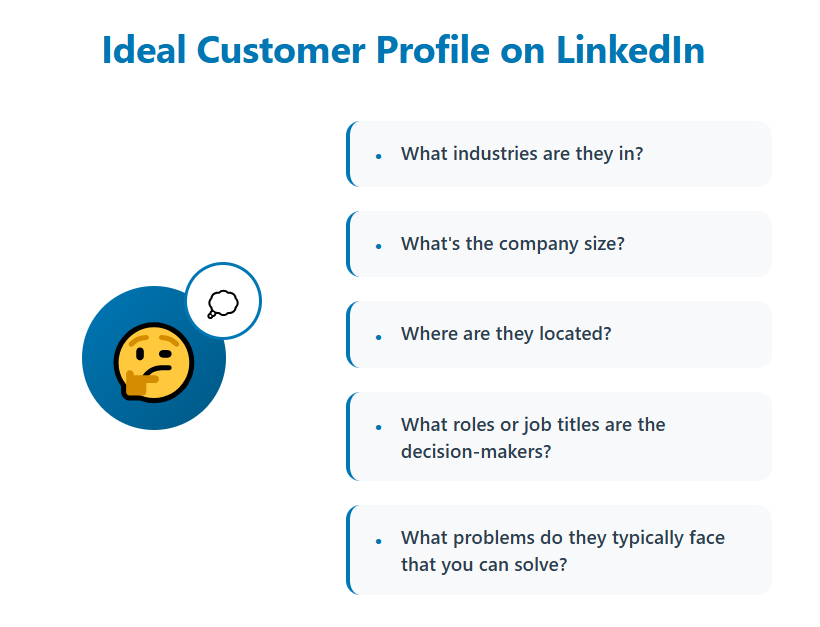
Define Your ICP (Ideal Customer Profile)
Vague targeting kills LinkedIn outreach campaigns faster than anything else.
Start by identifying the specific roles, industries, and company sizes that match your offer.
Be ruthlessly specific here. "Marketing professionals" is too broad. "VP of Marketing at B2B SaaS companies with 50-200 employees" is a target you can actually work with.
Think about who has the budget to buy what you're selling, who feels the pain you solve most acutely, and who has the authority to make purchasing decisions.
Sometimes that's the same person. Often it's not, and you need to adjust your LinkedIn outreach strategy accordingly.
Create a Personalized Messaging Framework
Here's what DOESN’T work: leading with your product, your features, or your company's impressive client list. Nobody cares — at least not yet.
Your LinkedIn outreach strategy should focus on pain points first, solutions second.
Reference something specific about their role, their company, or a challenge they're likely facing. Make it about them, not you.
Example opening line: "I saw you're scaling your sales team — curious how you're handling outreach at this stage?"
This is what makes a great LinkedIn message. Why? Because it's relevant, it shows you did two seconds of research, and it asks a question they might actually want to answer.
Compare that to "We help companies like yours generate more leads" — which one would you respond to?

What Personalized LinkedIn Outreach Actually Looks Like
Personalized LinkedIn outreach connects a real observation about the prospect to a problem your offer can address. A first name and company merge field make a message customized, but not necessarily relevant.
Weak personalization sounds like this:
“Hi Sarah, I saw you’re the VP of Sales at Acme. We help sales teams generate more leads.”
The details are accurate, but the message gives Sarah no meaningful reason to reply.
Stronger personalization sounds like this:
“Hi Sarah, noticed Acme is hiring its first enterprise account executives. Is the team also building a dedicated outbound pipeline for that segment?”
This version uses a visible business event, connects it to a plausible priority, and asks a question the prospect can answer without agreeing to a sales call.
Use one of these context types when personalizing outreach:
- A recent hiring pattern
- A funding, expansion, or acquisition announcement
- A change in role or leadership
- A post or comment written by the prospect
- A new product, market, or service
- A problem common to the prospect’s role and company stage
Do not force a superficial observation into every message. If there is no meaningful individual signal, write a segment-specific message based on a genuine shared problem.
Set Outreach Goals and Metrics
LinkedIn outreach performance varies by audience size, brand recognition, offer strength, market, sender profile, and qualification criteria. Treat benchmarks as diagnostic ranges rather than promises.
Track the campaign from first touch to revenue:
- Invitation acceptance rate: The percentage of sent invitations that become connections.
- Response rate: The percentage of delivered messages that receive any reply.
- Positive reply rate: The percentage of prospects who express interest, ask a relevant question, or agree to continue the conversation.
- Qualification rate: The percentage of positive replies that match your sales criteria.
- Meeting-booked rate: The percentage of contacted prospects who schedule a meeting.
- Meeting-held rate: The percentage of booked meetings that actually occur.
- Opportunity rate: The percentage of held meetings that become sales opportunities.
- Pipeline generated: The value of qualified opportunities influenced by the campaign.
Acceptance and response rates help diagnose campaign health, but they are not the final result. A campaign with fewer replies can outperform a higher-volume campaign if those replies come from better-fit accounts and convert into real opportunities.
How to Run a LinkedIn Outreach Campaign
A LinkedIn outreach campaign should move through a repeatable operating cycle:
1. Define one campaign audience
Choose one role, company profile, business problem, and relevant trigger. Do not combine several unrelated audiences simply to increase list size.
2. Build and validate the prospect list
Confirm that each contact matches the campaign criteria. Remove irrelevant titles, outdated profiles, current customers, competitors, and anyone already active in another sequence.
3. Write one message framework per segment
Create the core message around a shared business problem, then personalize it with relevant individual or account context.
4. Launch a controlled test
Start with a small, representative segment. Review acceptance, replies, objections, and qualification before expanding the campaign.
5. Review conversations, not just percentages
Read actual replies to understand whether the audience recognizes the problem and whether the offer is clear. A reply rate can look healthy while producing no qualified opportunities.
6. Adjust one variable at a time
Test the audience, opening line, problem statement, proof, or call to action separately. Changing every element at once makes it impossible to identify what improved performance.
7. Document what the campaign teaches you
Record which segments, triggers, objections, and messages produced qualified conversations. Use those findings to improve the next campaign rather than restarting from assumptions.
Build Multi-Step Follow-Up Sequences
The biggest mistake in LinkedIn outreach? Giving up after one message.
Most people don't respond to your first message. They're busy. They missed it. They meant to reply later and forgot. That doesn't mean they're not interested — it means you need to follow up.
Our best-performing campaigns use 3-5 touchpoints spread over 2-3 weeks. Here's a simple sequence structure that works:
- Message 1: Personalized opener focused on their pain point or situation.
- Message 2 (3-4 days later): Add value — share a relevant insight, article, or observation.
- Message 3 (4-5 days later): Soft call-to-action — "Would it make sense to chat briefly about this?".
- Message 4 (5-7 days later): The breakup message — "Should I assume this isn't a priority right now?".
Most meetings get booked after message 2 or 3. The people who respond to message 4 are often your most qualified prospects — they were interested but genuinely busy.
Optimize Your LinkedIn Profile
Here's something people forget: when you send a connection request, prospects check out your profile before accepting.
If your profile looks like a neglected resume from 2017, you're losing conversions before the conversation even starts.
Your profile should function like a landing page for your offer. That means:
- LinkedIn headline that states who you help and how — not just your job title.
- Banner image that reinforces your value proposition.
- About section that speaks directly to your ICP's pain points.
- Experience and featured sections that build credibility and showcase results.
When prospects land on your profile, they should immediately understand what you do, who you help, and why they should care.
If they're confused or underwhelmed, they won't accept your request — and your LinkedIn outreach strategy dies before it begins.
Explore More: 7 LinkedIn Profile Tips to Drive More B2B Inquiries (Guaranteed!)
How to Combine LinkedIn Outreach With Email Campaigns
LinkedIn and email should operate as one coordinated sequence rather than two campaigns targeting the same person independently. LinkedIn provides professional context and visibility, while email gives you more room to explain the problem, provide proof, or share a useful resource.
A practical multichannel sequence could look like this:
Day 1: View and research the prospect
Confirm that the person fits your ICP. Review their role, company, recent activity, and any business signal that gives your outreach a credible reason.
Day 2: Send a LinkedIn connection request
Keep the note short and contextual. Do not include a full pitch or calendar link.
Day 4: Send the first email
Introduce the business problem, explain why it may be relevant, and ask one focused question. The email should add substance rather than repeat the connection note.
Day 7: Engage on LinkedIn
If the prospect posts relevant content, add a thoughtful comment or reaction. Avoid manufactured engagement on old or unrelated posts.
Day 9: Send a LinkedIn follow-up
Reference the email naturally and give the prospect a simple way to respond.
Example:
“Hi Maya, I sent a short note about how teams are handling [problem]. Not sure if it reached you, but I was curious whether this is something your team is reviewing this quarter.”
Day 14: Send a value-led email
Share a concise case study, benchmark, checklist, or observation that helps the prospect evaluate the problem.
Day 20: Close the sequence
Acknowledge that the timing may be wrong and leave the door open without manufacturing urgency.
Every touch should add something new. If the email contains a case study, the LinkedIn message should not paste the same case study into the prospect’s inbox. The channels should support each other, not duplicate each other.
Record both channels in the same CRM timeline so sales representatives can see what the prospect received, opened, accepted, or answered. This prevents conflicting messages and makes follow-up feel informed.
LinkedIn Outreach Automation: How to Scale Without Spamming
LinkedIn outreach automation uses software tools to send connection requests, follow-up messages, and InMails automatically based on sequences you set up.
Instead of manually clicking through profiles and typing messages one by one, automation handles the repetitive work while you focus on having actual conversations with people who respond.
Think of it like email marketing, but for LinkedIn. You define your target audience, create your message sequence, and the tool executes it on your behalf.
The best LinkedIn automation tools make your outreach look and feel like you're doing it manually — because that's exactly how LinkedIn wants it to look.
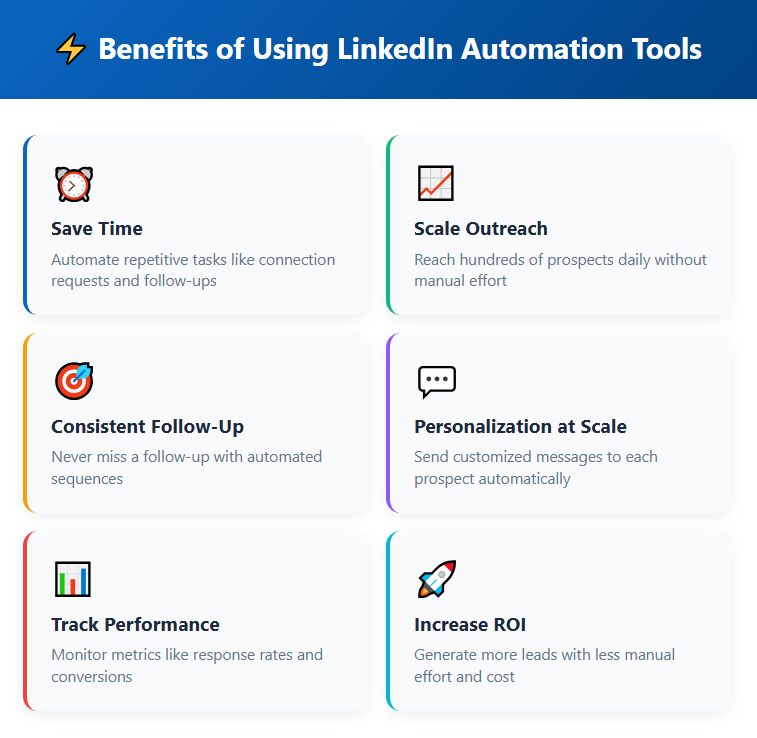
Why Businesses Use LinkedIn Outreach Automation
The benefits are pretty straightforward:
- Massive time savings
- Consistency
- Faster testing
- Scale without burning out
The Risks You Need to Know About
Here's where people get into trouble: LinkedIn doesn't love automation.
They tolerate it when done carefully, but push too hard and you'll get warnings, restrictions, or worse — a banned account.
- LinkedIn has limits — Too many connection requests in a day, too many messages to people you're not connected with, or behavior that looks bot-like will trigger flags.
- Compliance issues — If your tool isn't cloud-based and runs from your browser, LinkedIn can detect it more easily. Browser-based tools leave footprints that scream "I'm using automation."
- The spam trap — Just because you can send 100 connection requests a day doesn't mean you should. If your acceptance rate tanks because you're targeting poorly or your messages are generic, LinkedIn notices.
How to Automate LinkedIn Outreach Safely
The key to successful LinkedIn outreach automation is making it look human. That means staying within safe limits, personalizing your approach, and using tools that prioritize account safety.
👉 Use cloud-based automation tools
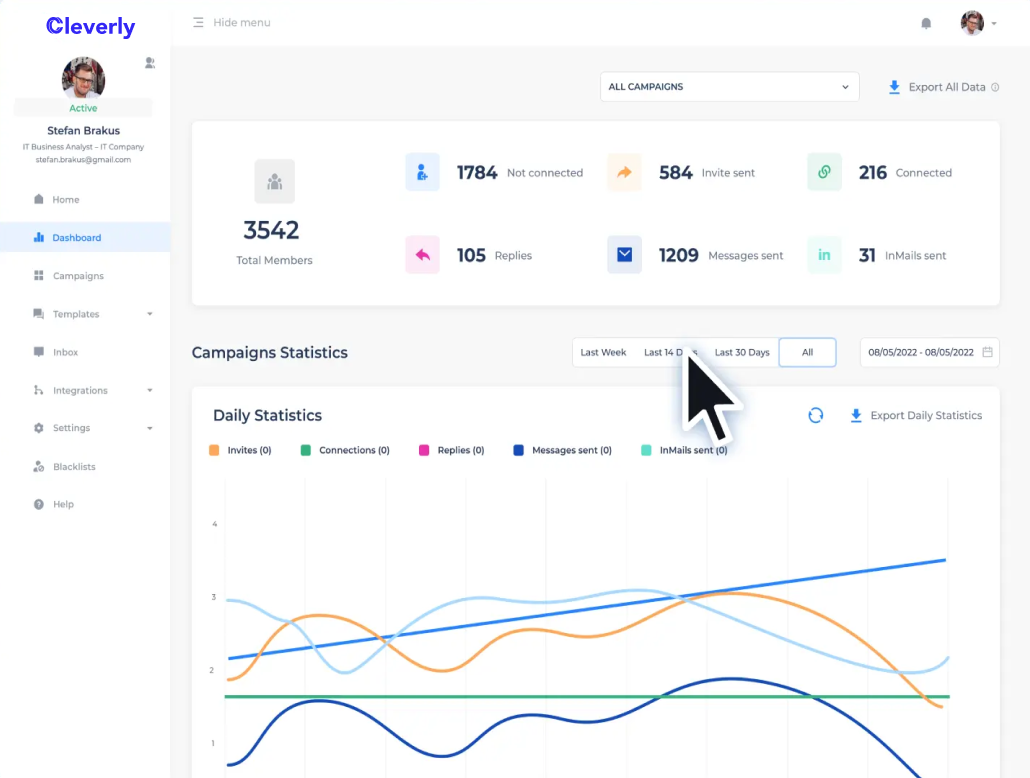
Tools like Cleverly's LinkedIn automation platform run in the cloud, not from your browser, which makes detection much harder.
Our clients get access to our automation tool with our LinkedIn lead gen services, and it's built specifically to stay under LinkedIn's radar.
👉 Limit your daily activity
Even with good automation, stay conservative. We recommend 30-50 connection requests per day maximum. LinkedIn's official limits are higher, but why risk it? Slow and steady wins this race.
👉 Personalize every message
This is non-negotiable. Use merge tags to insert names, companies, job titles, or any other data point that makes your message feel specific.
"Hi {{FirstName}}, I saw you're hiring at {{Company}}" performs infinitely better than "Hi, I help companies like yours."
👉 Warm up new accounts gradually
If you're starting fresh with automation, don't go from 0 to 50 requests on day one. Start with 10-15 per day for the first week, then scale up slowly. This mimics human behavior and keeps LinkedIn happy.
👉 Monitor your metrics religiously
Watch your acceptance rates and reply rates like a hawk. If they start dropping, pause your campaign and figure out what's wrong. Low engagement is the fastest way to trigger LinkedIn's spam filters.
Should You Automate Your LinkedIn Outreach?
If you're doing LinkedIn outreach at scale — and by scale we mean targeting hundreds or thousands of prospects per month — automation isn't optional.
It's the only way to maintain consistency without hiring a full-time SDR team.
But automation is a tool, not a strategy. It amplifies what you're already doing.
If your messaging is weak or your targeting is off, LinkedIn outreach automation will just help you fail faster. Get the fundamentals right first, then use automation to scale what's working.
💼 Smarter Outreach. Real Results.
Cleverly has helped 10,000+ clients generate $312M in pipeline through LinkedIn. Let’s make your outreach the next success story — start your campaign now.
Best LinkedIn Outreach Tools
The right LinkedIn outreach tools make your campaigns faster, safer, and way more personalized.
Here's our breakdown of the tools actually worth using in 2025.
🥇 Cleverly – Managed Outreach + Automation Platform
We'll be upfront: Cleverly isn't just a tool, it's a full done-for-you LinkedIn outreach service with automation built in.
If you want someone else to handle the entire campaign — targeting, messaging, follow-ups, and optimization — while you just show up for the booked meetings, this is it.
We've built our platform specifically for agencies, founders, and sales teams who want results without becoming LinkedIn prospecting experts.
You get the automation tool plus our team running your campaigns, testing messaging, and refining targeting based on what converts.
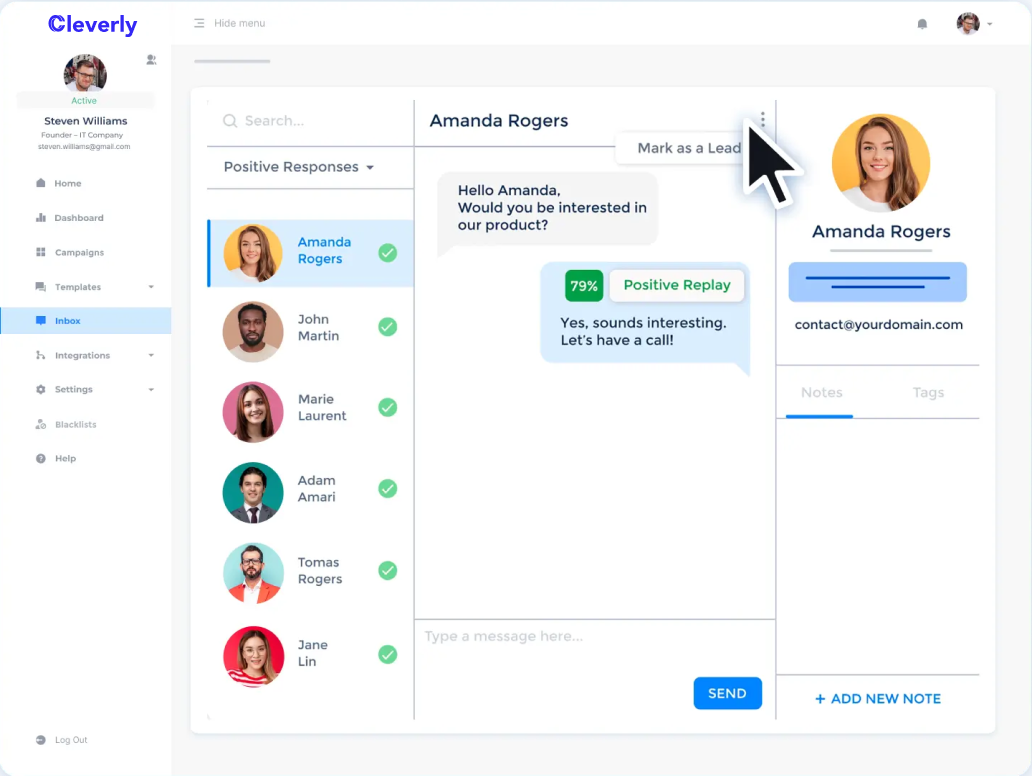
Key features:
- Full campaign management — Our team builds and runs your campaigns, so you're not figuring this out alone.
- Cloud-based automation — Send up to 500 connection invites and 800 InMails per month safely.
- Multichannel outreach — Combine LinkedIn with email in the same sequences.
- AI-driven lead inbox — Manage responses in real-time with smart prioritization.
- Sales Navigator & basic LinkedIn support — Works with whichever plan you have.
- Zapier integrations — Connect to your CRM and sync lead data automatically.
- CSV exports — Pull your data anytime for reporting or external tools.
If you want LinkedIn outreach automation without the learning curve or account risk, Cleverly handles it end-to-end.
🔥 Try Today!
2. Sales Navigator – Prospecting + Advanced Filters
Sales Navigator is LinkedIn's premium prospecting tool, and if you're serious about LinkedIn outreach, you absolutely need it.
The real value is in the search filters. You can drill down into hyper-specific audiences based on job title, seniority, company size, industry, geography, and even technology stack.
You can't get that level of targeting with basic LinkedIn.
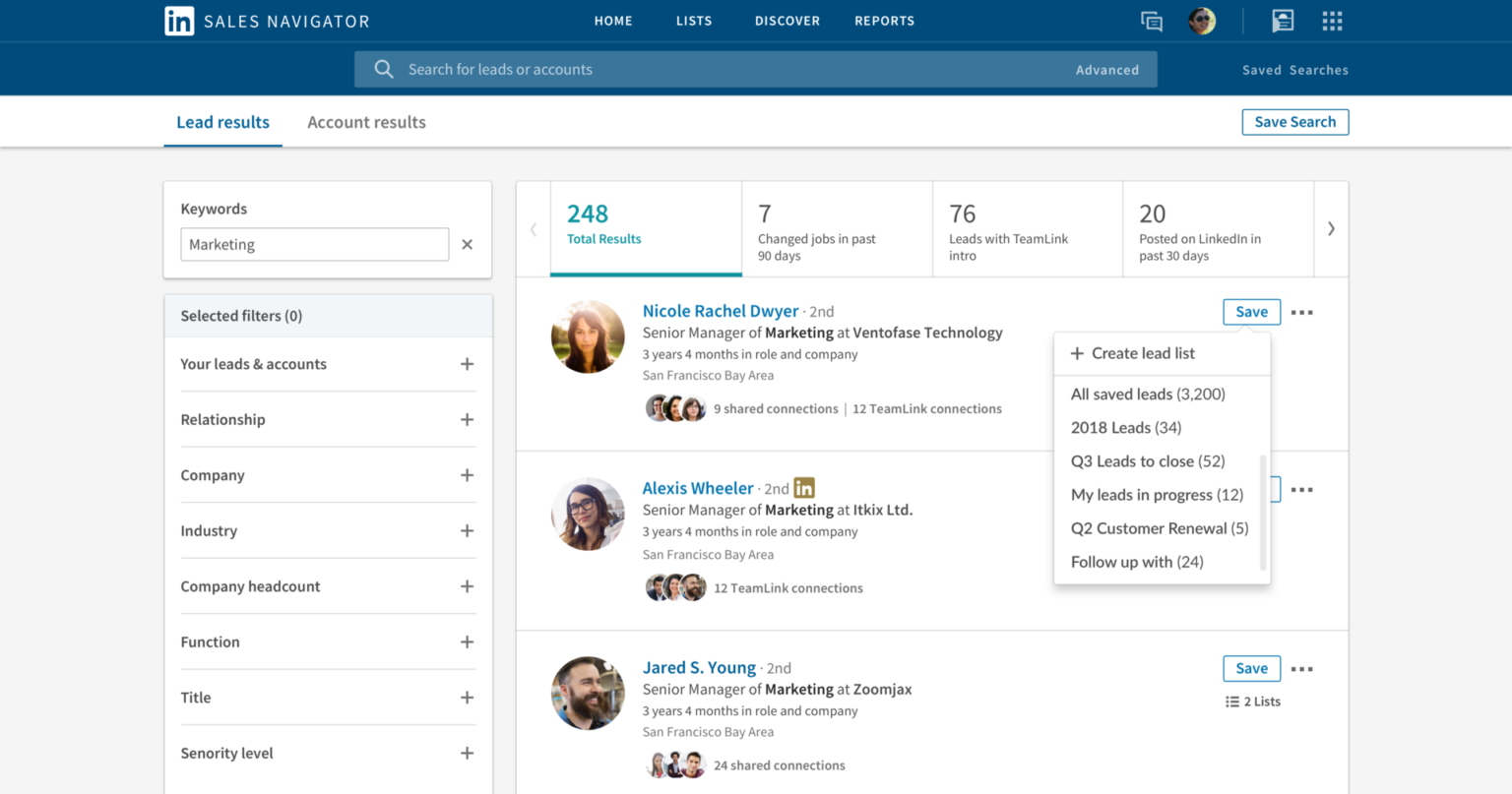
Key features:
- Advanced search filters — Target prospects by job function, seniority level, company headcount, revenue, and more.
- Lead recommendations — LinkedIn suggests prospects similar to ones you've saved or engaged with.
- InMail credits — Get 20-50 InMails per month depending on your plan.
- Boolean search — Combine keywords with AND/OR/NOT operators for precise targeting.
- CRM integrations — Sync with Salesforce, HubSpot, and other CRMs.
- Real-time updates — Get alerts when prospects change jobs, post content, or hit the news.
- Team collaboration — Share lead lists and notes with your sales team.
Dive Deep Into: Exact LinkedIn Sales Navigator Lead Workflow We Use to Book High-Quality B2B Meetings
3. Expandi – Cloud-Based LinkedIn Automation
Expandi is one of the safer automation tools out there because it's fully cloud-based. That means it doesn't run from your browser, which makes it much harder for LinkedIn to detect.
It's built for users who want control over their sequences without manually clicking through profiles.
The interface is clean, the campaign builder is intuitive, and it includes features like smart inbox management and image/GIF personalization that make your messages stand out.

Key features:
- Cloud-based operation — Runs from dedicated IP addresses, not your browser.
- Smart sequences — Build multi-step campaigns with conditional logic.
- Personalized images and GIFs — Add dynamic visuals with prospect names embedded.
- Safety limits — Built-in daily action limits to stay under LinkedIn's radar.
- A/B testing — Test different message variants and see what converts.
- Team collaboration — Manage multiple LinkedIn accounts from one dashboard.
- Zapier and webhook integrations — Connect to your CRM or other tools.
- Dedicated IP rotation — Mimics human behavior patterns to avoid detection
Compare: Expandi vs. Cleverly: Which Is Best for LinkedIn Lead Generation?
4. Skylead – AI-Powered LinkedIn Automation Tool and Cold Email Software
Skylead is another cloud-based LinkedIn automation tool primarily designed for agencies and sales teams.
However, it goes beyond standard LinkedIn automation by bringing prospecting, AI data enrichment, multichannel outreach, and AI-powered conversation handling into one platform.
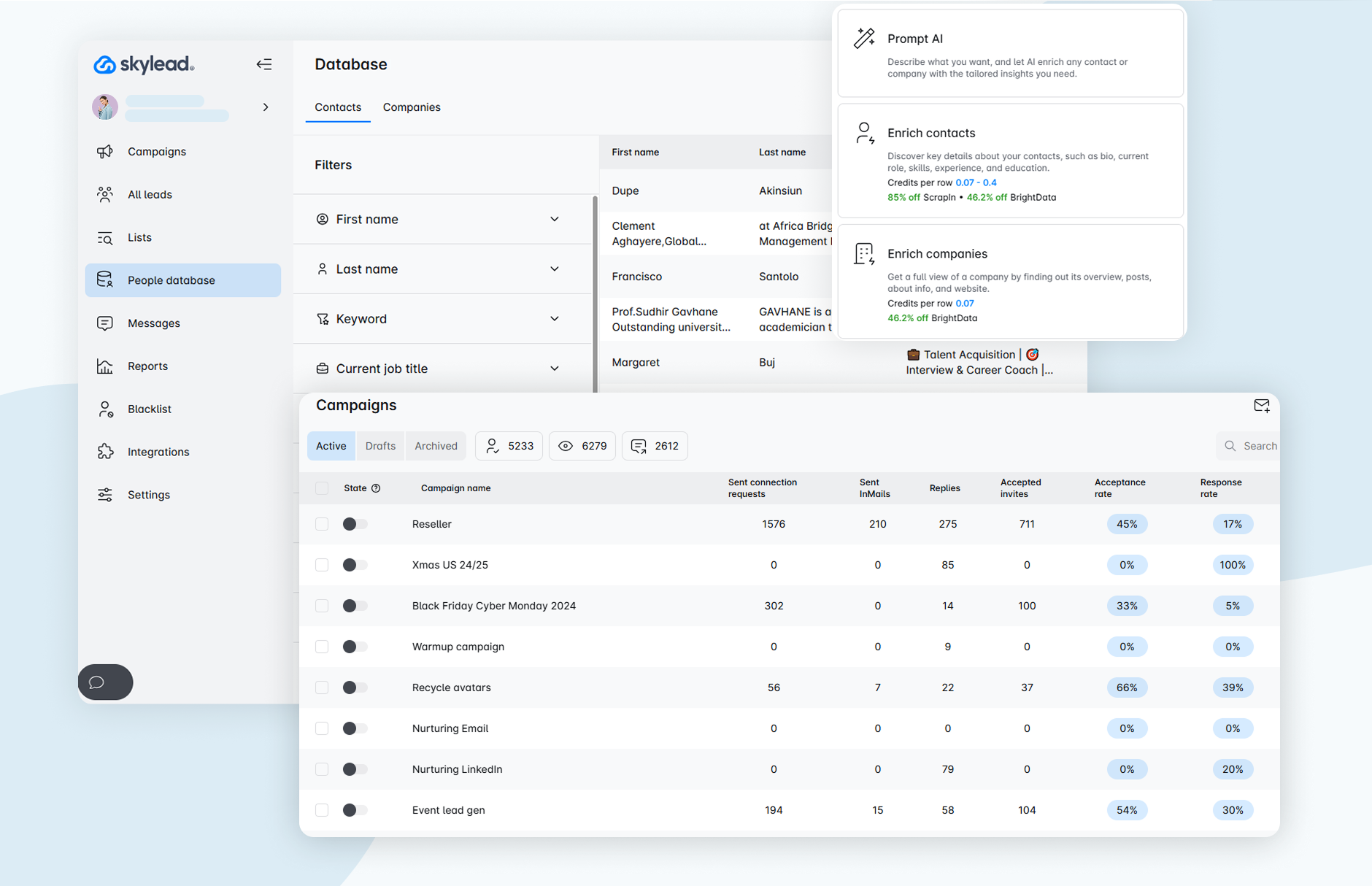
Key features:
- B2B database & account-based prospecting — Find target companies and relevant decision-makers directly inside Skylead.
- AI Data Enrichment — Use 20+ providers and 10+ company signals to enrich data and generate additional insights and personalization inputs.
- LinkedIn & email automation — Engage prospects across both channels from one platform instead of relying on LinkedIn-only sequences.
- Smart Sequences — Create conditional multichannel workflows that automatically adapt based on prospect behavior.
- Email discovery & verification — Find and verify business email addresses directly within the outreach workflow.
- Unlimited email accounts — Connect multiple sending accounts to send tens of thousands of emails a month.
- AI SDR — Handle prospect replies and follow-ups automatically and move qualified conversations toward booked meetings.
5. Dripify – Advanced Campaign Builder
Dripify is designed for people who want to build complex, branching outreach sequences.
If someone accepts your connection but doesn't reply, Dripify can automatically trigger a different follow-up path. It's one of the more sophisticated LinkedIn outreach tools for campaign logic.
It's also affordable compared to competitors, which makes it popular with solo founders and small sales teams testing LinkedIn outreach for the first time.

Key features:
- Drip campaigns with conditions — Create if/then logic based on prospect actions.
- Team inbox — Centralize all conversations in one place for team collaboration.
- Lead sourcing from Sales Navigator — Import leads directly from your Sales Nav searches.
- CSV import/export — Upload prospect lists or export data for reporting.
- Automated follow-ups — Send 2-5 touchpoints automatically based on response behavior.
- Analytics dashboard — Track connection rates, reply rates, and campaign performance.
- Safe daily limits — Automatically throttles activity to protect your account.
- Chrome extension — Manage campaigns without leaving LinkedIn.
6. Waalaxy – Lightweight LinkedIn Tool for Beginners
Waalaxy is the entry-level option for people just getting started with LinkedIn outreach tools. It's simple, affordable, and designed for users who don't want to spend hours learning a platform.
The tradeoff is less sophistication — you won't get the advanced targeting or conditional sequences that tools like Dripify offer.
But if you just need to send connection requests and follow-ups without overthinking it, Waalaxy gets the job done.

Key features:
- Freemium plan available — Start with limited features before upgrading.
- Simple campaign builder — Drag-and-drop interface for sequences.
- LinkedIn + email outreach — Combine both channels in the same campaign.
- CRM functionality — Basic lead management built into the platform.
- Prospect enrichment — Automatically find email addresses for LinkedIn contacts.
- Chrome extension — Runs from your browser (note: slightly higher detection risk).
- Pre-built templates — Use proven message sequences to get started fast.
- Task automation — Auto-visit profiles, endorse skills, and engage with content
Which Tool Should You Choose?
Honestly, it depends on what you need. If you want LinkedIn done-for-you campaigns with expert management, Cleverly is the move — you get the tool plus the team that knows how to use it.
If you're building your own campaigns and need advanced targeting, pair Sales Navigator with a cloud-based automation tool like Expandi or Dripify.
If you're just starting out and want something simple, Waalaxy gets you moving quickly without the learning curve.
The best LinkedIn outreach tools are the ones you'll actually use consistently. Pick based on your experience level, budget, and how hands-on you want to be with campaign management.
LinkedIn Outreach Templates That Get Replies
Good news: you don't need to reinvent the wheel every time you message someone.
Here are LinkedIn outreach templates you can customize and deploy in minutes.
Template 1 – Connection Request
When to use it: First touchpoint when sending a connection request with a note.
"Hi [Name], saw your post on [topic] — loved your take on [specific insight]. Would be great to connect and swap ideas on [relevant niche]."
Why it works: You referenced something specific they posted, which immediately separates you from the "I'd like to add you to my professional network" crowd. It's short, relevant, and gives them a reason to accept.
Template 2 – Follow-Up Message (After Connection)
When to use it: 2-3 days after they accept your connection request.
"Hey [Name], quick question — how are you currently handling [specific pain point]? We've helped teams like [similar company] simplify this with [brief solution mention]."
Why it works: You're asking about their situation, not pitching yours. The question makes it conversational, and mentioning a similar company builds instant credibility. This LinkedIn outreach template gets replies because it's about them, not you.
Template 3 – Value Message (After Acceptance)
When to use it: When you want to share something helpful before making an ask.
"Thanks for connecting, [Name]! Just wrapped up a case study on how [Company X] hit [specific result] in [timeframe]. Thought it might be relevant given what you're working on. Want me to send it over?"
Why it works: You're leading with value, not a sales pitch. Case studies and results are naturally intriguing, and asking permission to share keeps it low-pressure. People respond well to LinkedIn outreach templates that give before they ask.
Template 4 – InMail Message (If Not Connected)
When to use it: When you're reaching out via InMail to someone you're not connected with.
"Hi [Name], reaching out because I noticed [specific observation about their company/role]. Quick question — are you open to exploring new approaches to [relevant challenge]?"
Why it works: InMails have limited characters and need to hook fast. This template shows you did research, asks a simple yes/no question, and positions you as someone with solutions, not just another vendor. It's one of our most effective LinkedIn outreach templates for cold InMail campaigns.
Recommended Reading: 10 High-Converting LinkedIn InMail Templates to Boost Your Outreach Success
How to Customize These Templates
These LinkedIn outreach templates are starting points, not copy-paste scripts. The magic happens in the customization:
- Replace [Name] with their actual first name.
- Replace [topic] or [insight] with something they recently posted or commented on.
- Replace [pain point] with a challenge specific to their role or industry.
- Replace [Company X] or [similar company] with a real client in their space
The more specific you get, the higher your reply rates climb. Spend 30 seconds per message personalizing, and you'll outperform 95% of the generic outreach filling up LinkedIn inboxes.
How Cleverly Helps Businesses Build Scalable LinkedIn Outreach Systems
Tools don't book meetings. Strategy does.
That's where working with a LinkedIn outreach agency like Cleverly changes everything.
We don't just hand you software and wish you luck — we build the entire system for you, then run it while you focus on closing deals.
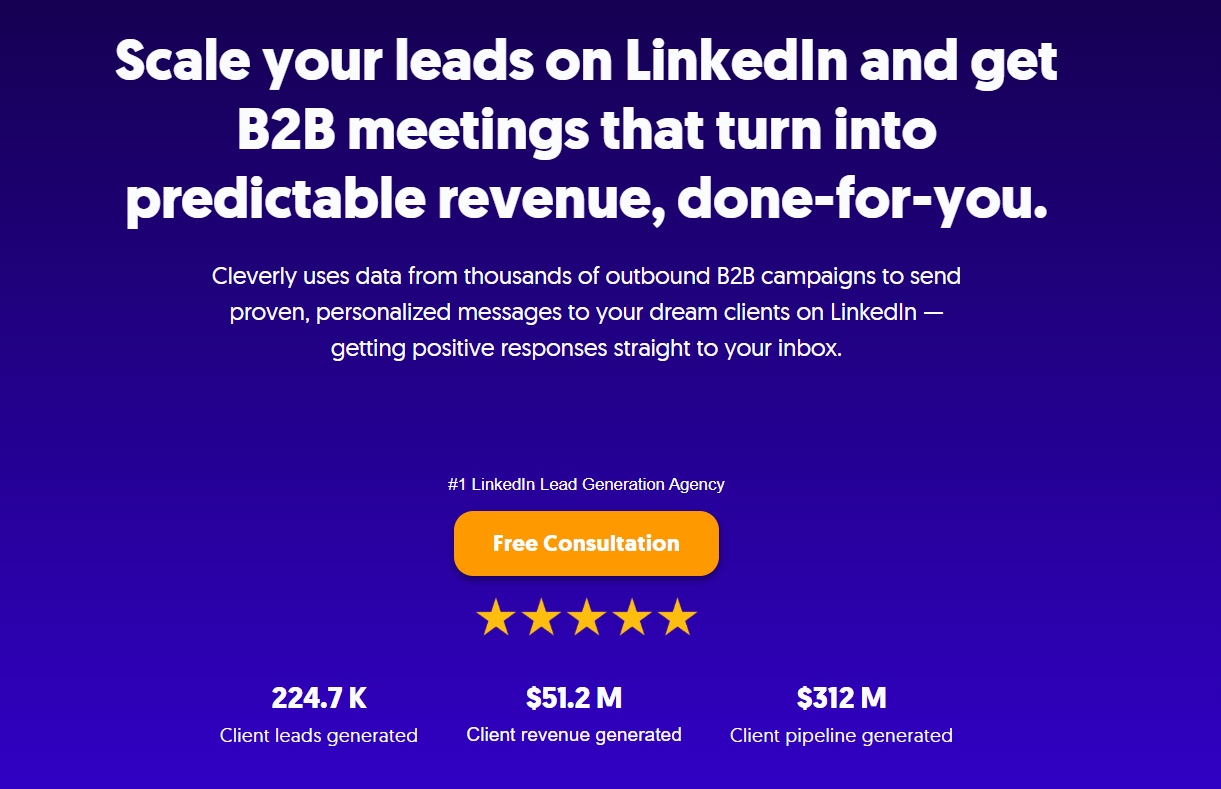
Done-for-you campaigns from day one, AI + human optimization and meeting-ready leads, not just connections at just $397/mo.
Cleverly doesn't just automate LinkedIn outreach — we build a personalized lead generation system that books qualified meetings while you focus on growing your business.
Ready to stop guessing and start booking? Let's build your outreach system →

Conclusion
Effective LinkedIn outreach starts with a narrow audience, a credible reason to make contact, and a message that reflects the prospect’s situation. The sequence then builds the conversation through useful follow-ups rather than repeated requests for a meeting.
LinkedIn can also work alongside email when both channels share the same campaign context. Coordinated touches give prospects more ways to respond while preventing the disconnected messages that make multichannel outreach feel careless.
Start with a controlled audience, review the quality of the replies, and adjust one variable at a time. The goal is not to send the maximum number of messages. It is to create a repeatable path from relevant contact to qualified conversation.
Frequently Asked Questions
Free Resource
How to Scale a Profitable Cold Call System
Get the complete guide — download it instantly now.

Free Ebook
Download the Free Guide
Enter your details to get instant access.
You're all set! 🎉
Your ebook is downloading now.
Click below if the download didn't start automatically.